2014-10-06

Monitor Blocked Process and Deadlock using Extended Events

Using the free "Idera SQL Check" is great for real-time monitoring your SQL Server, but a historical log is much more important for you to investigate the performance problem. The Extended Events feature in SQL Server 2012 can be used to fulfill this need.

-- Blocked Process monitor --
sp_configure 'show advanced options', 1 ;
GO
RECONFIGURE ;
GO
sp_configure 'blocked process threshold', 10 ;
GO
RECONFIGURE ;
GO

CREATE EVENT SESSION [blockingMonitor] ON SERVER
ADD EVENT sqlserver.blocked_process_report(
ACTION(sqlos.task_time,sqlserver.database_id,sqlserver.database_name,sqlserver.request_id,sqlserver.sql_text))
ADD TARGET package0.event_file(SET filename=N'C:\Guosen\SqlMonitor\blockingMonitor.xel')
WITH (MAX_MEMORY=4096 KB,EVENT_RETENTION_MODE=ALLOW_SINGLE_EVENT_LOSS,MAX_DISPATCH_LATENCY=30 SECONDS,MAX_EVENT_SIZE=0 KB,MEMORY_PARTITION_MODE=NONE,TRACK_CAUSALITY=ON,STARTUP_STATE=OFF)
GO

ALTER EVENT SESSION [blockingMonitor] ON SERVER STATE=START
GO

-- Deadlock monitor --
CREATE EVENT SESSION [Deadlock_Graph] ON SERVER
ADD EVENT sqlserver.xml_deadlock_report
ADD TARGET package0.event_file(SET filename=N'C:\Guosen\SqlMonitor\Deadlock_Graph.xel',max_file_size=(100),max_rollover_files=(10))
WITH (MAX_MEMORY=4096 KB,EVENT_RETENTION_MODE=ALLOW_SINGLE_EVENT_LOSS,MAX_DISPATCH_LATENCY=30 SECONDS,MAX_EVENT_SIZE=0 KB,MEMORY_PARTITION_MODE=NONE,TRACK_CAUSALITY=OFF,STARTUP_STATE=ON)
GO

Then you can check the log in SSMS illustrated as below.

Get the permissions, roles, and default schema of database user

You can check the granted permissions, roles, and default schema of an database user by using the SSMS GUI. By the way, by using Transact-SQL, you can get these information quickly for all database users one shot.

/* List all permissions on database users & roles */
SELECT
princ.name,
princ.type_desc,
perm.[permission_name],
perm.state_desc,
perm.class_desc,
OBJECT_NAME(perm.major_id) AS [object]
FROM sys.database_principals princ
LEFT JOIN sys.database_permissions perm
ON perm.grantee_principal_id = princ.principal_id
ORDER BY princ.type_desc, princ.name, [object], perm.[permission_name]

/* List all users and associated roles */
SELECT rp.name AS database_role, mp.name AS database_user
FROM sys.database_role_members AS drm
JOIN sys.database_principals rp ON drm.role_principal_id = rp.principal_id
JOIN sys.database_principals mp ON drm.member_principal_id = mp.principal_id
ORDER BY database_role, database_user

/* List default schema of each user */
SELECT default_schema_name,
type_desc,
name,
create_date
FROM sys.database_principals
ORDER BY default_schema_name, type_desc, name

Check the DB size and table size in SQL Azure

Calculating the database size is very important, especially for a SQL Azure database, as it determines the editions you can choose and how much money you need to pay.
System stored procedure sp_spaceused is unavailable in SQL Azure. But you can still check the DB size and table size by running the following SQL statements:

select sum(reserved_page_count) * 8.0 / 1024 AS [DB size MB] from sys.dm_db_partition_stats

select sys.objects.name, sum(reserved_page_count) * 8.0 / 1024 AS [size MB]
from sys.dm_db_partition_stats, sys.objects
where sys.dm_db_partition_stats.object_id = sys.objects.object_id
--and sys.objects.type = 'U'
group by sys.objects.name
ORDER BY [size MB] DESC

By filtering the results where sys.objects.type = 'U', you can get the user tables only; otherwise system tables will be included.

2014-07-29

Difference of Isolation Levels between Azure SQL DB and on-premise SQL Server DB

By default, when you create a new database on an on-premise SQL Server, the database options of isolation level, READ_COMMITTED_SNAPSHOT and ALLOW_SNAPSHOT_ISOLATION, should be turned OFF (default settings in the model database). But in Azure SQL DB, both of them are turned ON and can't be turned off (ref.: http://msdn.microsoft.com/en-us/library/ee336245.aspx#isolevels). You can check the difference by running the following statement:

SELECT name, snapshot_isolation_state, is_read_committed_snapshot_on FROM sys.databases

So, if you migrate your database from on-premise SQL Server to Azure SQL, make sure your program code doesn't depend on Shared Locks to maintain data integrity.

2014-06-16

Caution in Updateable ColumnStore Index in SQL Server 2014

The introduction of ColumnStore Indexes in SQL Server 2012 was one of the hottest new features. A columnstore index stores data in a column-wise (columnar) format, unlike the traditional B-tree structures used for rowstore indexes, which store data row-wise (in rows). This structure can offer significant performance gains for queries that summarize large quantities of data, the sort typically used for business intelligence (BI) and data warehousing. Unfortunately, they had 2 big limitations:
- only support Non-Clustered ColumnStore Indexes
- table had created a ColumnStore Index becomes READ ONLY table
However, SQL Server 2014 provides you an Updateable Clustered ColumnStore Index! Let’s have a more detailed look on how this magic and illusion happens internally in SQL Server.
The first most important fact is that an underlying direct update of a ColumnStore Index is not possible! It would be too time consuming to do the complete decompress and compress on the fly during your INSERT, UPDATE, and DELETE transactions. Therefore SQL Server 2014 uses help from some magic: Delta Stores and Delete Bitmaps.
Every time when you run an INSERT statement, the new record isn’t directly inserted into the ColumnStore Index – the record is inserted into a Delta Store. The Delta Store itself is nothing else than a traditional B-Tree structure with all its pro’s and con’s. When you afterwards read from the ColumnStore Index, SQL Server returns you the data from the compressed ColumnStore Index AND also from the Delta Store.
When you run an DELETE statement, again nothing happens in the compressed ColumnStore Index. The only thing that happens is that the record is deleted logically through a Delete Bitmap. Every record in the ColumnStore Index has a corresponding bit in that Delete Bitmap. When you again read your ColumnStore Index, SQL Server just discards the rows that are marked as deleted in the Delete Bitmap.
And running an UPDATE statement just means inserting the new version into the Delta Store, and marking the old version as deleted in the Delete Bitmap.
The following picture (source http://research.microsoft.com/apps/pubs/default.aspx?id=193599) shows this concept.
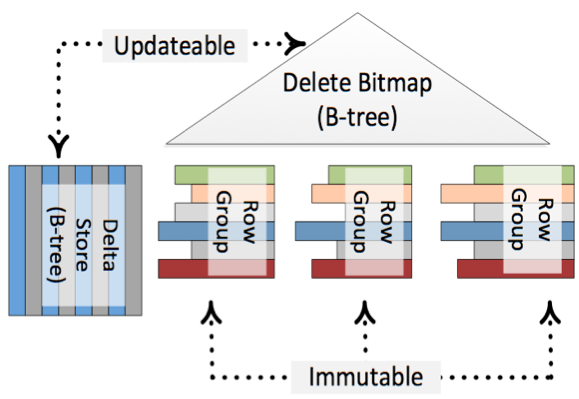
Because of the Delta Stores and the Delete Bitmap it seems that your ColumnStore Index is updateable, but in reality it is just immutable. There is also a background process called the Tuple Mover, which runs regularly and finally pushes your changes asynchronously into the compressed ColumnStore Index.
According to BOL, row groups in deltastore can be in one of 3 possible statuses: OPEN (a read/write row group that is accepting new records. An open row group is still in rowstore format and has not been compressed to columnstore format), CLOSED (a row group that has been filled, but not yet compressed by the tuple mover process) and COMPRESSED (a row group that has filled and compressed). COMPRESSED actually means that data is already part of the index. Row groups that are still in OPEN or CLOSED state are yet to be added to the index and currently reside somewhere in deltastore.
Anyway, performance difference between fully updated columnstore index and situation when part of your data that is still in OPEN or CLOSED state in deltastore is huge. So we would like the background process that indexes and compresses data to be as fast as possible. Unfortunately it is painfully slow.
Suppose you loaded billions of rows into a clustered columnstore index. When loading had finished, actually the clustered columnstore index is NOT ready yet, many rows are still in deltastore, waiting for the tuple mover to compress them. During this transition state, if you run a query on this table, it scans the entire deltastore. It's because there is no traditional b-tree index on the data in deltastore, and columnstore index isn’t ready yet. Even if required data resides fully inside columnstore index, SQL Server cannot be sure about that, so scan is inevitable.
What does it mean? It means that updateable clustered/nonclustered columnstore indexes should be used with extreme caution. If your data is constantly updated (loaded) or if you have huge single ETL but not enough time for a background process to calculate entire index before users start to query it – result can be extremely painful.

2014-05-12

SQL Agent Job Checker

Below SQL script is the body content of a sql agent job which sends email of failed agent jobs since yesterday:

SET NOCOUNT ON;

DECLARE @Value [varchar] (2048)
    ,@JobName [varchar] (2048)
    ,@PreviousDate [datetime]
    ,@Year [varchar] (4)
    ,@Month [varchar] (2)
    ,@MonthPre [varchar] (2)
    ,@Day [varchar] (2)
    ,@DayPre [varchar] (2)
    ,@FinalDate [int]
-- Declaring Table variable
DECLARE @FailedJobs TABLE ([JobName] [varchar](200))

-- Initialize Variables
SET @PreviousDate = DATEADD(dd, - 1, GETDATE())
SET @Year = DATEPART(yyyy, @PreviousDate)

SELECT @MonthPre = CONVERT([varchar](2), DATEPART(mm, @PreviousDate))

SELECT @Month = RIGHT(CONVERT([varchar], (@MonthPre + 1000000000)), 2)

SELECT @DayPre = CONVERT([varchar](2), DATEPART(dd, @PreviousDate))

SELECT @Day = RIGHT(CONVERT([varchar], (@DayPre + 1000000000)), 2)

SET @FinalDate = CAST(@Year + @Month + @Day AS [int])

-- Final Logic
INSERT INTO @FailedJobs
SELECT DISTINCT j.[name]
FROM [msdb].[dbo].[sysjobhistory] h
INNER JOIN [msdb].[dbo].[sysjobs] j
    ON h.[job_id] = j.[job_id]
INNER JOIN [msdb].[dbo].[sysjobsteps] s
    ON j.[job_id] = s.[job_id]
        AND h.[step_id] = s.[step_id]
WHERE h.[run_status] = 0
    AND h.[run_date] > @FinalDate

SELECT @JobName = COALESCE(@JobName + ', ', '') + '[' + [JobName] + ']'
FROM @FailedJobs

SELECT @Value = 'Failed SQL Agent job(s) found: ' + @JobName + '. '

IF @Value IS NULL
BEGIN
    SET @Value = 'None.'
END

DECLARE @recipients varchar(max) = '<you and other DBA>'
DECLARE @subject nvarchar(255) = @@SERVERNAME + ' SQL Agent Job Failed since yesterday'
DECLARE @body nvarchar(MAX) = @Value

EXEC msdb.dbo.sp_send_dbmail @recipients = @recipients, @subject = @subject, @body_format = 'html', @body = @body;

2014-03-27

The right way to do case insensitive string comparison

If you have a case-sensitive database, and you need to do case insensitive string comparison on a table column, you may think using LOWER() or UPPER() function to convert that column value. Don't bother to do this, because it makes your code clumsy, also you will get slow performance as the conversion function hinders SQL Server query engine to use any index on that column. If you are sure that column is case insensitive, you should specify the collation of that column, that's all you need to do simple and clean. E.g.
CREATE TABLE [dbo].[Keyword](
  [id] [int] IDENTITY(1,1) NOT NULL,
  [keyword] [nvarchar](400) COLLATE SQL_Latin1_General_CP1_CI_AS NOT NULL,
  [lastModifiedTime] [datetime] NOT NULL)