In order to reduce disk I/O and improve performance, add more RAM to your SQL Server machine is the most intuitive idea. However, how can you know your SQL queries get benefit from more RAM? Below SQL query helps you to check the content of the SQL Server buffer cache, it shows you the top 50 objects (tables and indexes) there, by the number of data pages, of the current database.
;WITH memusage_CTE AS (SELECT bd.database_id, bd.file_id, bd.page_id, bd.page_type
, COALESCE(p1.object_id, p2.object_id) AS object_id
, COALESCE(p1.index_id, p2.index_id) AS index_id
, bd.row_count, bd.free_space_in_bytes, CONVERT(TINYINT,bd.is_modified) AS 'DirtyPage'
FROM sys.dm_os_buffer_descriptors AS bd
JOIN sys.allocation_units AS au
ON au.allocation_unit_id = bd.allocation_unit_id
OUTER APPLY (
SELECT TOP(1) p.object_id, p.index_id
FROM sys.partitions AS p
WHERE p.hobt_id = au.container_id AND au.type IN (1, 3)
) AS p1
OUTER APPLY (
SELECT TOP(1) p.object_id, p.index_id
FROM sys.partitions AS p
WHERE p.partition_id = au.container_id AND au.type = 2
) AS p2
WHERE bd.database_id = DB_ID() AND
bd.page_type IN ('DATA_PAGE', 'INDEX_PAGE','TEXT_MIX_PAGE') )
SELECT TOP 50 DB_NAME(database_id) AS 'Database',OBJECT_NAME(object_id,database_id) AS 'Table Name', index_id,COUNT(*) AS 'Pages in Cache', SUM(dirtyPage) AS 'Dirty Pages'
FROM memusage_CTE
GROUP BY database_id, object_id, index_id
ORDER BY COUNT(*) DESC

SQL Server Technical Blog by a Microsoft Certified Professional in SQL Server - LEE HongLeung, Peter

2013-10-08
Import data from SQL Server to Excel using VBA
Excel is a great tools for reporting, many users prefer data can be provided in Excel format, so that they can further manipulate it. Here is an simple example demonstrating how to import the result set of a SQL Server stored procedure into Excel using VBA code.
Sub DataExtract()
' Create a connection object.
Dim conn As ADODB.Connection
Set conn = New ADODB.Connection
' Provide the connection string.
Dim strConn As String
' Use the SQL Server OLE DB Provider.
strConn = "PROVIDER=SQLOLEDB;"
' Connect to the database.
strConn = strConn & "DATA SOURCE=YourSqlServer;INITIAL CATALOG=YourDB;"
' Open the connection.
conn.Open strConn, "YourSqlAccount", "YourSqlPassword"
' Create a recordset object.
Dim rs As ADODB.Recordset
Set rs = New ADODB.Recordset
With rs
' Assign the Connection object.
.ActiveConnection = conn
' Extract the required records by a select statement or execute a stored proc.
.Open "EXEC YourStoredProc;"
' Print field headers on 1st row
For i = 1 To .Fields.Count
Cells(1, i).Value = .Fields(i - 1).Name
Next i
' Copy the records into cell A2 on Sheet1.
Worksheets("Sheet1").Range("A2").CopyFromRecordset rs
' Tidy up
.Close
End With
conn.Close
Set rs = Nothing
Set conn = Nothing
End Sub
Sub DataExtract()
' Create a connection object.
Dim conn As ADODB.Connection
Set conn = New ADODB.Connection
' Provide the connection string.
Dim strConn As String
' Use the SQL Server OLE DB Provider.
strConn = "PROVIDER=SQLOLEDB;"
' Connect to the database.
strConn = strConn & "DATA SOURCE=YourSqlServer;INITIAL CATALOG=YourDB;"
' Open the connection.
conn.Open strConn, "YourSqlAccount", "YourSqlPassword"
' Create a recordset object.
Dim rs As ADODB.Recordset
Set rs = New ADODB.Recordset
With rs
' Assign the Connection object.
.ActiveConnection = conn
' Extract the required records by a select statement or execute a stored proc.
.Open "EXEC YourStoredProc;"
' Print field headers on 1st row
For i = 1 To .Fields.Count
Cells(1, i).Value = .Fields(i - 1).Name
Next i
' Copy the records into cell A2 on Sheet1.
Worksheets("Sheet1").Range("A2").CopyFromRecordset rs
' Tidy up
.Close
End With
conn.Close
Set rs = Nothing
Set conn = Nothing
End Sub
2013-10-07
T-SQL to Check Running Sessions and Statements
Below SQL script can be used to query the current running sessions and their executing statements. It also shows whether it's a parallel execution (multi-thread), which login account, whether it's being blocked and its blocker, what resource it's waiting for, the CPU and I/O usage, etc.
SELECT CASE WHEN (SELECT COUNT(*) FROM sysprocesses WHERE spid = r.spid) > 1 THEN 'Multithread' ELSE '' END AS Multithread, LEFT(t.[text], 255) AS [text255], SUBSTRING( t.[text], (r.stmt_start / 2) + 1, (( CASE r.stmt_end WHEN -1 THEN DATALENGTH(t.[text]) ELSE r.stmt_end END - r.stmt_start) / 2) + 1) AS stmt, DB_NAME(t.dbid) AS ObjectDB, OBJECT_NAME(t.objectid, t.dbid) AS Object, r.spid, r.ecid, r.blocked, r.waittime, r.lastwaittype, r.waitresource, DB_NAME(r.dbid) AS connectDB, r.cpu, r.physical_io, r.memusage, r.login_time, r.last_batch, r.open_tran, r.status, r.hostname, r.program_name, r.loginame, r.cmd, r.net_library, r.login_time, r.stmt_start, r.stmt_end FROM sys.sysprocesses AS r CROSS APPLY sys.dm_exec_sql_text(r.[sql_handle]) AS t WHERE r.status IN ('runnable', 'suspended', 'running', 'rollback', 'pending', 'spinloop') ORDER BY spid, ecid
Below screen illustrates the query result (split to two rows)"

SELECT CASE WHEN (SELECT COUNT(*) FROM sysprocesses WHERE spid = r.spid) > 1 THEN 'Multithread' ELSE '' END AS Multithread, LEFT(t.[text], 255) AS [text255], SUBSTRING( t.[text], (r.stmt_start / 2) + 1, (( CASE r.stmt_end WHEN -1 THEN DATALENGTH(t.[text]) ELSE r.stmt_end END - r.stmt_start) / 2) + 1) AS stmt, DB_NAME(t.dbid) AS ObjectDB, OBJECT_NAME(t.objectid, t.dbid) AS Object, r.spid, r.ecid, r.blocked, r.waittime, r.lastwaittype, r.waitresource, DB_NAME(r.dbid) AS connectDB, r.cpu, r.physical_io, r.memusage, r.login_time, r.last_batch, r.open_tran, r.status, r.hostname, r.program_name, r.loginame, r.cmd, r.net_library, r.login_time, r.stmt_start, r.stmt_end FROM sys.sysprocesses AS r CROSS APPLY sys.dm_exec_sql_text(r.[sql_handle]) AS t WHERE r.status IN ('runnable', 'suspended', 'running', 'rollback', 'pending', 'spinloop') ORDER BY spid, ecid
Below screen illustrates the query result (split to two rows)"

2013-10-06
Email Alert of error in database Mirroring
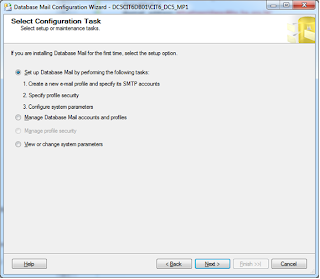
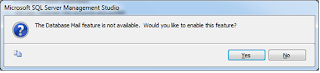
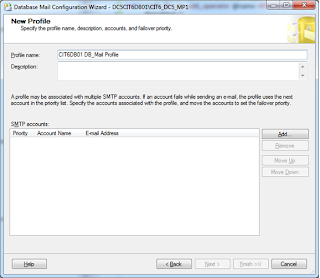
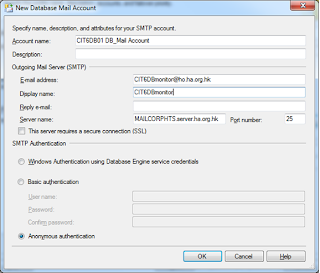
Here is an example that step-by-step demonstrate how to to configure an email alert of error in database mirroring:
1. Configure Database Mail.
2.Register the SQL server on SMTP server to allow it send email.
3. Send Test E-Mail to try it, by right click Database Mail, Send Test E-Mail.
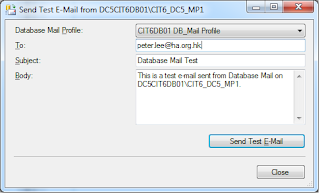
4. Create WMI event alert under SQL Server Agent, Alerts.
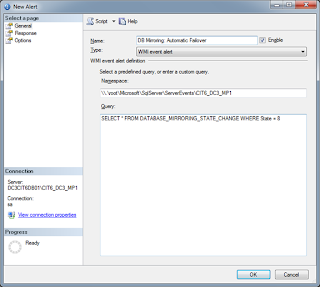
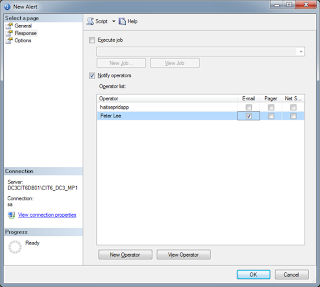
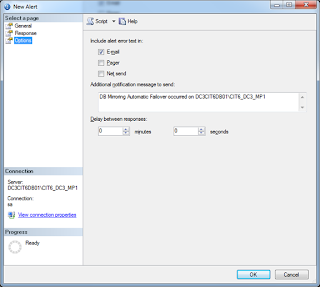
5. Set SQL Agent Alert Email Profile.
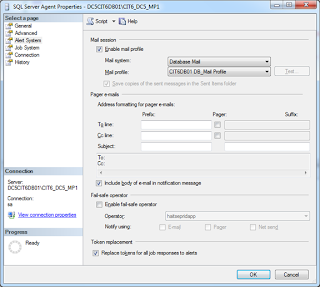
6. Restart SQL Server Agent (if cluster, use Failover Cluster Manager, take attention NOT to stop SQL Server).
1. Configure Database Mail.


2.Register the SQL server on SMTP server to allow it send email.
3. Send Test E-Mail to try it, by right click Database Mail, Send Test E-Mail.

4. Create WMI event alert under SQL Server Agent, Alerts.


5. Set SQL Agent Alert Email Profile.

6. Restart SQL Server Agent (if cluster, use Failover Cluster Manager, take attention NOT to stop SQL Server).
2013-10-04
SQL Server FlashBack - Restore Database from pre-created Snapshot
SQL Server hasn't got the FlashBack technology like Oracle, but you still can achieve a quick rollback of the whole database to a previous time. By pre-creating a database snapshot before you apply any change on the database like bulk data import and batch job execution, you are able to rollback the whole database from the database snapshot. Below is an example:
1. Create the DB Snapshot before apply data change
CREATE DATABASE YourDB_Snapshot ON
(NAME = YourDB_Data, FILENAME = 'R:\YourDB_Snapshot_Data.ss'),
(NAME = YourDB_Data1, FILENAME = 'R:\YourDB_Snapshot_Data1.ss'),
(NAME = YourDB_Data2, FILENAME = 'R:\YourDB_Snapshot_Data2.ss')
AS SNAPSHOT OF YourDB;
2. Apply any data change you like to do
3. Restore the database from the snapshot
RESTORE DATABASE YourDB FROM DATABASE_SNAPSHOT = ‘YourDB_Snapshot';
4. Drop the Snapshot after finished use
DROP DATABASE YourDB_Snapshot;
1. Create the DB Snapshot before apply data change
CREATE DATABASE YourDB_Snapshot ON
(NAME = YourDB_Data, FILENAME = 'R:\YourDB_Snapshot_Data.ss'),
(NAME = YourDB_Data1, FILENAME = 'R:\YourDB_Snapshot_Data1.ss'),
(NAME = YourDB_Data2, FILENAME = 'R:\YourDB_Snapshot_Data2.ss')
AS SNAPSHOT OF YourDB;
2. Apply any data change you like to do
3. Restore the database from the snapshot
RESTORE DATABASE YourDB FROM DATABASE_SNAPSHOT = ‘YourDB_Snapshot';
4. Drop the Snapshot after finished use
DROP DATABASE YourDB_Snapshot;
Kick All Connections Out and Restore Database
When you want to restore a database from a backup image, especially the case that you wanna refresh the testing environment with the latest production data, you will like to kill all connections from the testing database and restore it at once. Below sql script can be used:
USE master
GO
-- Kill All Connections to a single DB
ALTER DATABASE YourDB SET SINGLE_USER WITH ROLLBACK IMMEDIATE;
GO
RESTORE DATABASE YourDB FROM DISK = N'backup file location' WITH REPLACE
GO
-- Resume
ALTER DATABASE YourDB SET MULTI_USER;
GO
USE master
GO
-- Kill All Connections to a single DB
ALTER DATABASE YourDB SET SINGLE_USER WITH ROLLBACK IMMEDIATE;
GO
RESTORE DATABASE YourDB FROM DISK = N'backup file location' WITH REPLACE
GO
-- Resume
ALTER DATABASE YourDB SET MULTI_USER;
GO
SQL Script to Check Backup/Restore Progress
Sometimes you wanna check the database backup or restore progress, but the operation may be fired by a sql server agent job, by a scheduled batch, or by another user. Such cases you cannot check the restore progress using management studio GUI. Below is the sql script that you can use:
SELECT r.session_id,r.command,CONVERT(NUMERIC(6,2),r.percent_complete) AS [Percent Complete],CONVERT(VARCHAR(20),DATEADD(ms,r.estimated_completion_time,GetDate()),20) AS [ETA Completion Time], CONVERT(NUMERIC(10,2),r.total_elapsed_time/1000.0/60.0) AS [Elapsed Min], CONVERT(NUMERIC(10,2),r.estimated_completion_time/1000.0/60.0) AS [ETA Min], CONVERT(NUMERIC(10,2),r.estimated_completion_time/1000.0/60.0/60.0) AS [ETA Hours], CONVERT(VARCHAR(1000),(SELECT SUBSTRING(text,r.statement_start_offset/2, CASE WHEN r.statement_end_offset = -1 THEN 1000 ELSE (r.statement_end_offset-r.statement_start_offset)/2 END) FROM sys.dm_exec_sql_text(sql_handle))) FROM sys.dm_exec_requests r WHERE command IN ('RESTORE DATABASE','BACKUP DATABASE', 'RESTORE LOG', 'BACKUP LOG')
SELECT r.session_id,r.command,CONVERT(NUMERIC(6,2),r.percent_complete) AS [Percent Complete],CONVERT(VARCHAR(20),DATEADD(ms,r.estimated_completion_time,GetDate()),20) AS [ETA Completion Time], CONVERT(NUMERIC(10,2),r.total_elapsed_time/1000.0/60.0) AS [Elapsed Min], CONVERT(NUMERIC(10,2),r.estimated_completion_time/1000.0/60.0) AS [ETA Min], CONVERT(NUMERIC(10,2),r.estimated_completion_time/1000.0/60.0/60.0) AS [ETA Hours], CONVERT(VARCHAR(1000),(SELECT SUBSTRING(text,r.statement_start_offset/2, CASE WHEN r.statement_end_offset = -1 THEN 1000 ELSE (r.statement_end_offset-r.statement_start_offset)/2 END) FROM sys.dm_exec_sql_text(sql_handle))) FROM sys.dm_exec_requests r WHERE command IN ('RESTORE DATABASE','BACKUP DATABASE', 'RESTORE LOG', 'BACKUP LOG')
Subscribe to:
Posts (Atom)